
VoStack Part 2: A Daily Digest Written by Claude
A couple of weeks ago I wrote about VoStack, the 2×2 wall of 5” USB touchscreens on my desk. Since then three things have happened: another screen died, the dashboard got a website, and, the one I’m most pleased with, it now has a page that Claude writes for me every day.
Another screen down
The replacement screen arrived, with the newer USB-C driver board, and it works perfectly. It went straight onto pattern before anything else, as promised, and passed every test.
Then one of the three older screens started banding, the same vertical stripes as the dead panels in the first batch. The older panels’ ribbon cables are a little sensitive, and this one didn’t survive. So it’s back to three working screens and another replacement on its way.
The good news is that everything else carried on. VoStack now runs on the Raspberry Pi 3B+ in Docker, deployed through Portainer like the rest of my homelab stack, and screens can be plugged in while it’s running, so the replacement can go straight in when it arrives.
A website, for when I’m not at the desk
With a screen out, and with the box only useful when I’m sitting in front of it, I wanted to see the dashboard from anywhere. So VoStack now serves a website on port 8090 alongside the screens.
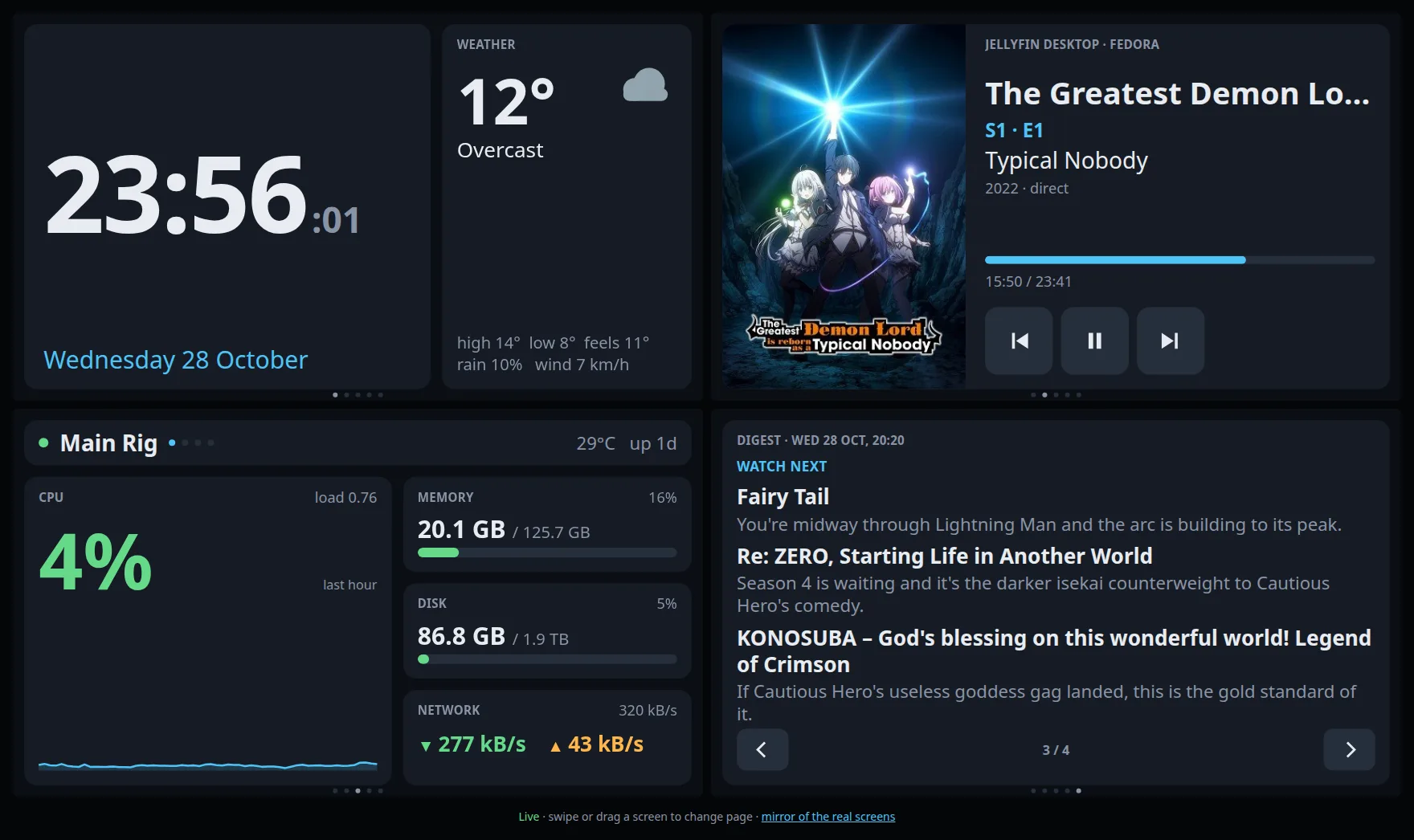
It’s the same pages rebuilt in HTML and CSS, laid out as the four screens, two to a row (one on a phone). Each screen is a strip of every page, so you swipe on a touchscreen or drag with a mouse, just like the real thing. The data comes from a JSON endpoint every two seconds, and the clock and progress bars tick in the browser in between. The Jellyfin buttons work too, so I can pause whatever’s playing from my phone.
The trade-off is that every widget now exists twice: once drawn with SkiaSharp for the screens, and once in JavaScript for the browser. Change one, change both. For a project this size that’s fine.
One small thing that made a big difference: Jellyfin clients report a pause a few seconds late, so pressing pause used to look like it hadn’t worked. Now the button flips straight away and holds the new state for up to five seconds until Jellyfin catches up.
There’s no login, so it’s LAN only. Anyone on my network can pause my anime. I can live with that.
The big one: a daily digest from Claude
The Claude Max plan includes $100 of API credit a month, and I wanted something small and useful to spend a bit of it on every day. VoStack already talks to Jellyfin, Sonarr and Radarr, so it knows what’s in my library and what I’ve been watching. That’s exactly what a “what should I watch tonight?” page needs.
Once a day, VoStack gathers the facts and asks Claude to write them up:
- from Jellyfin, what I’ve watched in the last two weeks, what’s in progress, the next episodes of shows I’m following, and a random sample of unwatched films and series I already have
- from Sonarr and Radarr, what’s coming up and the full list of titles I already own
It’s all sent as one JSON message, with a short system prompt: British English, casual and brief, “like a friend who knows their taste”, no marketing language, no emoji. The reply has to match a JSON schema, so there’s no parsing prose. What comes back is a headline and a few sections, shown one at a time with ‹ › buttons, on the screens and the website alike.
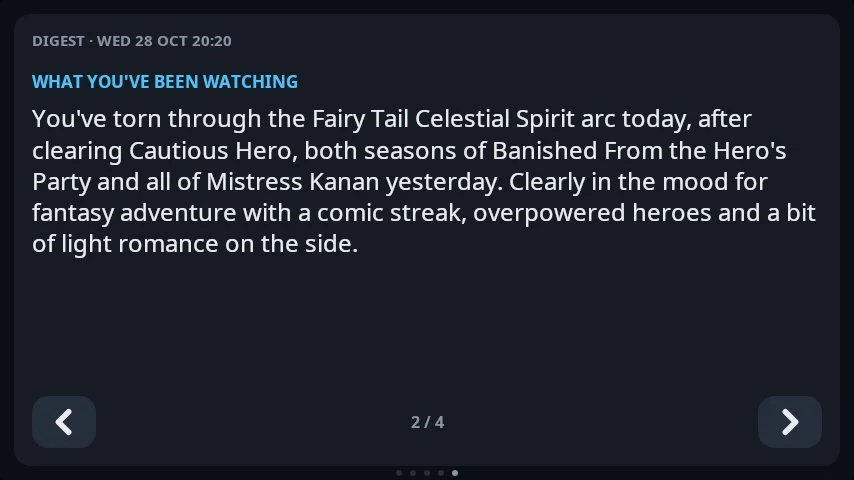
What you’ve been watching is two or three sentences on what I’ve been watching and the pattern in it.
I’m on a bit of an anime kick at the moment, and the digest picked up on it straight away. Fairy Tail, Cautious Hero, Banished From the Hero’s Party: it read the list and summed me up as being “in the mood for fantasy adventure with a comic streak, overpowered heroes and a bit of light romance on the side”. Fair.
The picks lean into it too, with the odd one that pushes it somewhere different, like Re:Zero as “the darker isekai counterweight to Cautious Hero’s comedy”.
Watch next is three to five picks, taken only from things I already have, each with one line tied to what I’ve watched recently.

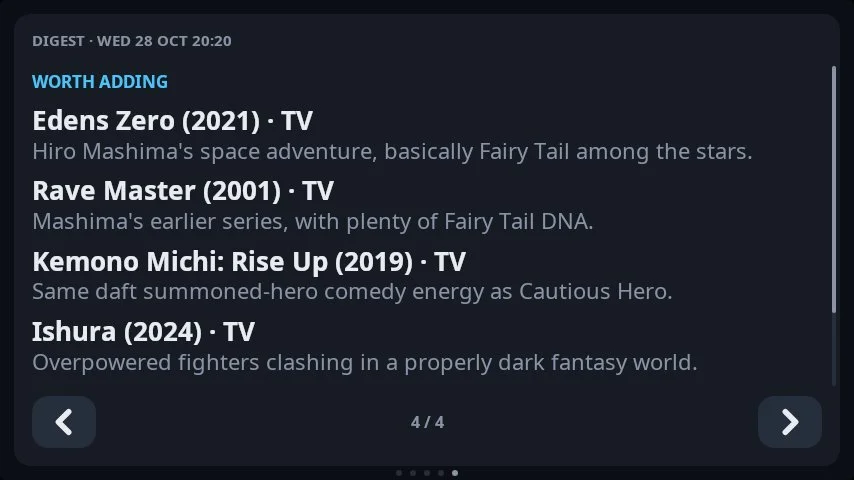
Worth adding is a handful of things I don’t have yet that fit my taste.
Not trusting it blindly
A language model suggesting films will happily suggest a film that doesn’t exist, or one I already have. So the code doesn’t take the suggestions on trust:
- Watch next must use the exact names from the library sample it was given. It can only pick from what’s there.
- Worth adding asks for up to ten suggestions, each with its year and the title it’s listed under on TMDb or TVDB. Every one is then looked up in Sonarr or Radarr. If the lookup can’t find it, it’s dropped. If the lookup finds it but it already has an ID, it’s already in my library, and it’s dropped too. The first five that survive are shown.
The lookup is a bit forgiving, because lookup titles are often longer than the ones people use (“Mushoku Tensei” against “Mushoku Tensei: Jobless Reincarnation”), so a prefix match counts, and the year can be out by one.
The request also turns on the API’s server-side refusal fallback. If a safety check ever declines the request, it’s retried on a fallback model instead of leaving me with an empty page.
Keeping the cost down
The digest is written once a day, at a set hour (7am by default), and the result is saved to a state volume on the Pi. A restart never causes a call: it only writes a new one if the saved report is older than that hour today. If a call fails, it waits half an hour before trying again rather than retrying every minute. There’s a vostack digest --facts command that prints exactly what would be sent, with no API call, which made it easy to check the data before spending anything.
Each digest is about 20k tokens in and a few thousand out, which is around 10 to 15 cents a day on Opus 5.5 at medium effort. That’s a few dollars a month out of the $100, so there’s plenty of room left for other ideas.
On the screens, a section that’s taller than the page moves on a screenful every 12 seconds, and tapping the text moves it on straight away. On the website it just scrolls.
Working with Claude, again
As before, this was built with Claude in Claude Code, and every commit is co-authored. There’s something a bit circular about Claude writing the code that calls Claude, including the system prompt it’ll be given every morning.
What I still bring is the judgement: reading the digest on the actual box and deciding whether it’s useful, and whether the picks are any good. Claude can’t see the screen, and it doesn’t know what I’m in the mood for tonight.
What’s next
- The fourth screen, again. Fit the next replacement, run
pattern, thenidentify. - Print the rest. The clamps, shells and base, then heat-set inserts and glue.
- More for the digest. The printer and the homelab both have stories to tell. A line about what the 3D printer did overnight, or which machine has been running hot, would fit nicely.
- The 7.8” strip, still on the list.